
Virtual annual meeting: how to run your HOA annual meeting online

The annual meeting is coming, and the clubhouse holds 30 people for a community of 200 homes. Last year eight neighbors came, the board struggled to reach quorum, and the owners who live out of state or work evenings never had a chance to take part.
A virtual annual meeting can fix that, but only if it follows your rules. This guide explains how to check whether you can meet online, how to send notice and count votes, and how to run the meeting so it is as fair and clear as an in-person one.
What a Virtual Annual Meeting Is
A virtual annual meeting is the yearly meeting of the association’s members held by video call, by phone, or both. Owners join from home, and the board runs the same agenda it would in a room: reports, the budget, board elections and any votes the documents require.
A hybrid meeting mixes the two, with some people in a room and others online. Our post on transitioning to hybrid HOA meetings covers that format.
Whether you may meet online depends on your governing documents, the rulebook that explains how the community is supposed to run, and on your state’s law. Some documents allow remote meetings, some require an in-person gathering, and some are silent. State law may fill the gaps or add limits. For example, Florida’s statute allows notice by electronic transmission to owners who have consented in writing, and it allows mail-in secret ballots only if the governing documents permit them.
Why It Matters for HOAs
The annual meeting is where owners elect the board and vote on major items. A meeting that does not follow the rules can be challenged, and a challenged election or budget vote can cost the association time and legal fees.
Online meetings can still solve real problems:
- Attendance: owners who travel, work shifts or live elsewhere can take part.
- Quorum: more attendees and clearer proxies make it easier to reach the number your documents require.
- Records: a recording, if your rules allow one, supports accurate minutes.
- Cost: no room rental and fewer printed packets.
The risks are also real. Some owners lack a reliable connection or are uneasy with technology, and a poorly run call can feel less fair than a room. A board that plans for both groups avoids common complaints.
How HOA Boards Should Handle It
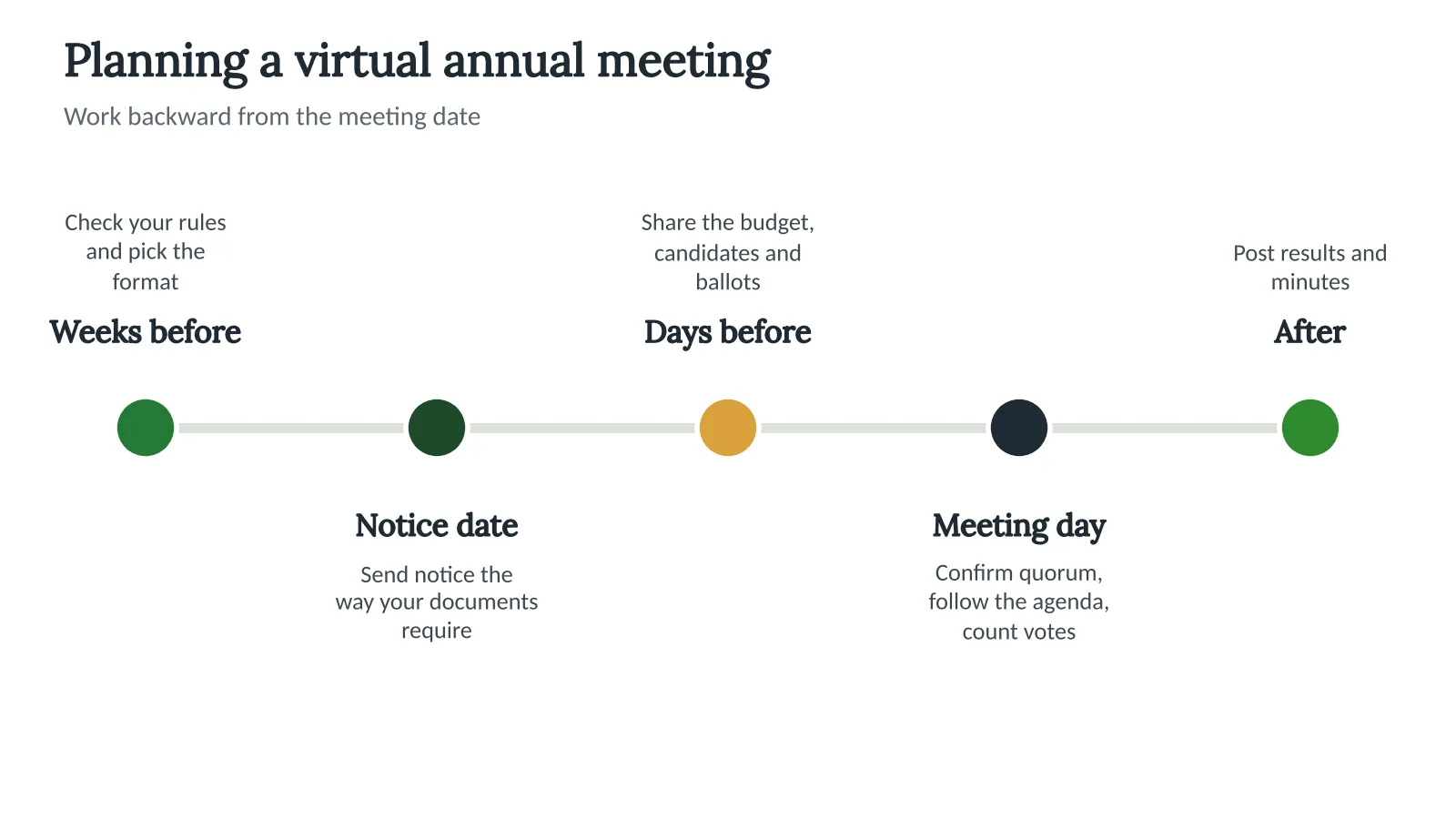
Work backward from the meeting date. The picture below shows the order of the main steps.
Plan the meeting
- Check your rules. Read your documents and state law for remote meetings, electronic notice and online voting. Ask an attorney if they are unclear.
- Choose the format. Pick virtual or hybrid, and plan a phone option for owners who cannot use video.
- Send proper notice. Follow your documents for lead time and delivery method. Include the date, time, how to join, the agenda and how to vote or send a proxy.
- Share materials early. Send the budget, the candidate list and any ballots before the meeting.
- Run it by the agenda. Open with how the meeting will work, confirm quorum, then move through the items.
- Publish the results. Share the vote counts and the minutes after the meeting.
Quorum and voting
Quorum is the number of owners who must take part before the meeting can make decisions, and your documents set that number. Count attendance online the same way you would in a room, and write down the count. If your documents allow proxies or absentee ballots, collect them before the meeting. Our posts on quorum and absentee voting explain each one.
Here is a simple example. A community of 200 homes has a quorum of 20%, which is 40 homes. If 25 owners join live and 18 send proxies, 43 homes are represented, and the meeting can proceed. Always check what your own documents say counts toward quorum.
Assign roles
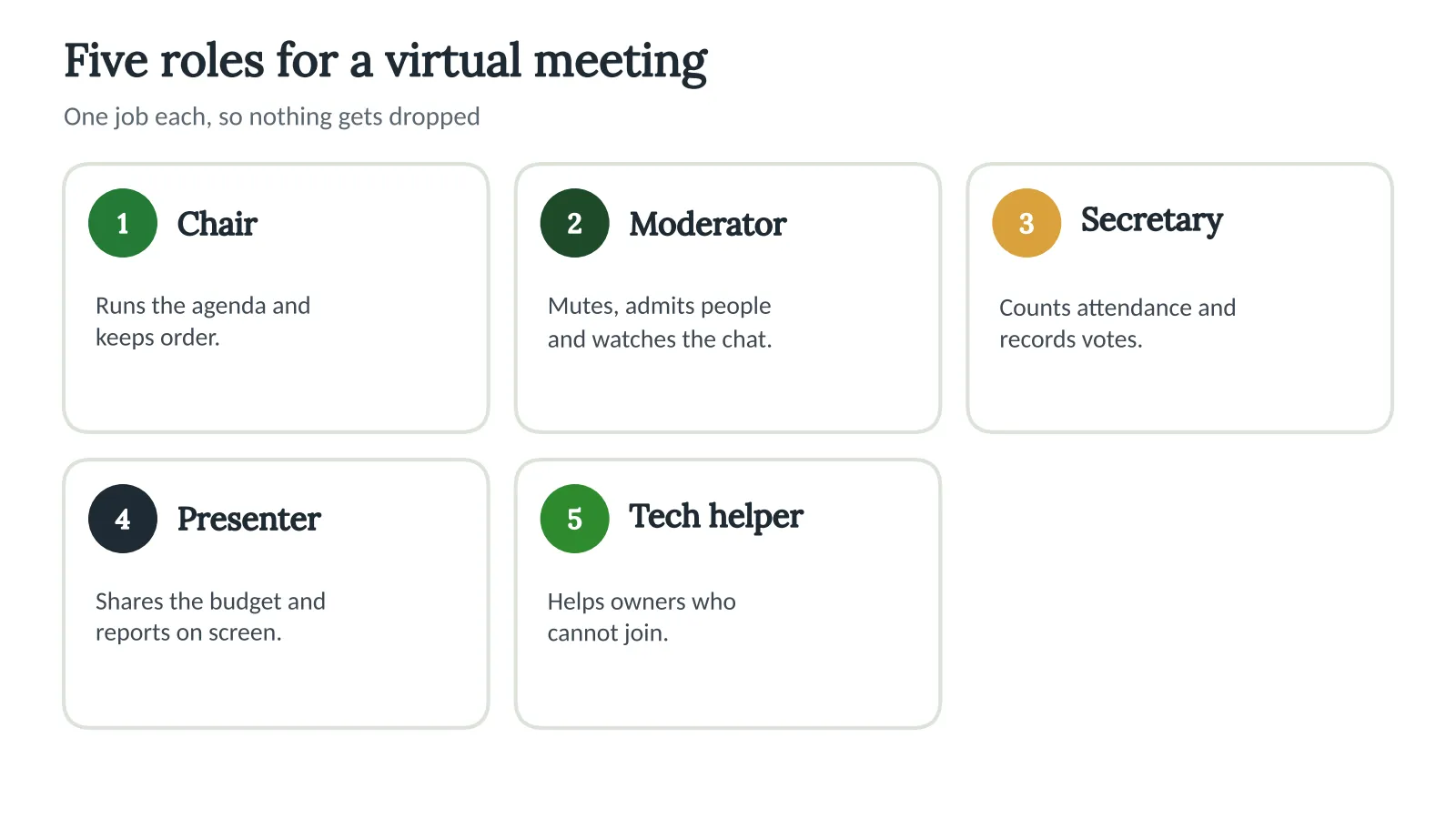
A single person trying to run the agenda, watch the chat and manage the screen will drop something. Share the work.
Run the meeting fairly
- Start with ground rules: how to ask a question, how long each person may speak, and how votes are counted.
- Mute owners by default and call on people in the order they ask.
- Put the agenda and any document on screen so people can follow along.
- Offer a phone-in number and a way to ask questions by text or email.
- Record the meeting only if your rules allow it, and tell people it is being recorded.
Our guide to meeting minutes explains how to record the decisions, and our post on meeting notices covers the notice itself.
How Technology Can Help
The video call is the easy part. The paperwork around it is where boards get stuck: sending notice on time, collecting votes, counting them and keeping the record. Neighborhood.online walks the board through each meeting, step by step. The agenda starts with standing items filled in, the notice goes out on time, and minutes are drafted from the meeting.
When your documents allow online voting, Neighborhood.online supports votes with one vote per lot. Ballot links work without an account, and results are counted and kept on file. Notices are written once and sent by email, first-class mail or certified mail, the way each neighbor asked, with a delivery record showing who got it and when. Nothing goes out until the board approves it.
Key takeaways
- Check your documents and state law before you plan a virtual annual meeting.
- Send notice the way your documents require, and include how to join and how to vote.
- Count quorum and proxies the same way you would in a room, and write the numbers down.
- Assign roles so one person is not running everything, and offer a phone option.
- Publish the vote results and the minutes soon after the meeting.
Frequently asked questions
Can an HOA hold its annual meeting online?
It depends on your governing documents and state law. Some allow it, some require an in-person meeting, and some are silent. Ask an attorney if you are not sure.
Does a virtual meeting count toward quorum?
Often, yes, if your documents and state law allow remote attendance to count. Check the wording in your bylaws, and keep a written count of who attended and how.
Can owners vote online in an HOA election?
Only if your documents and state law allow it. Some states set specific rules for electronic and mail-in ballots, so ask an attorney before you change how votes are cast.
Do we have to record a virtual meeting?
Your rules decide. Some states and documents require or restrict recordings. If you record, tell attendees at the start and keep the file with the minutes.
Sources
- Florida Legislature. (2026). The 2026 Florida Statutes, section 720.306: Meetings of members; voting and election procedures; amendments. flsenate.gov
This post is general information, not legal advice. Laws change, and your governing documents may add rules of their own. We recommend consulting an attorney. We can help you find one.


